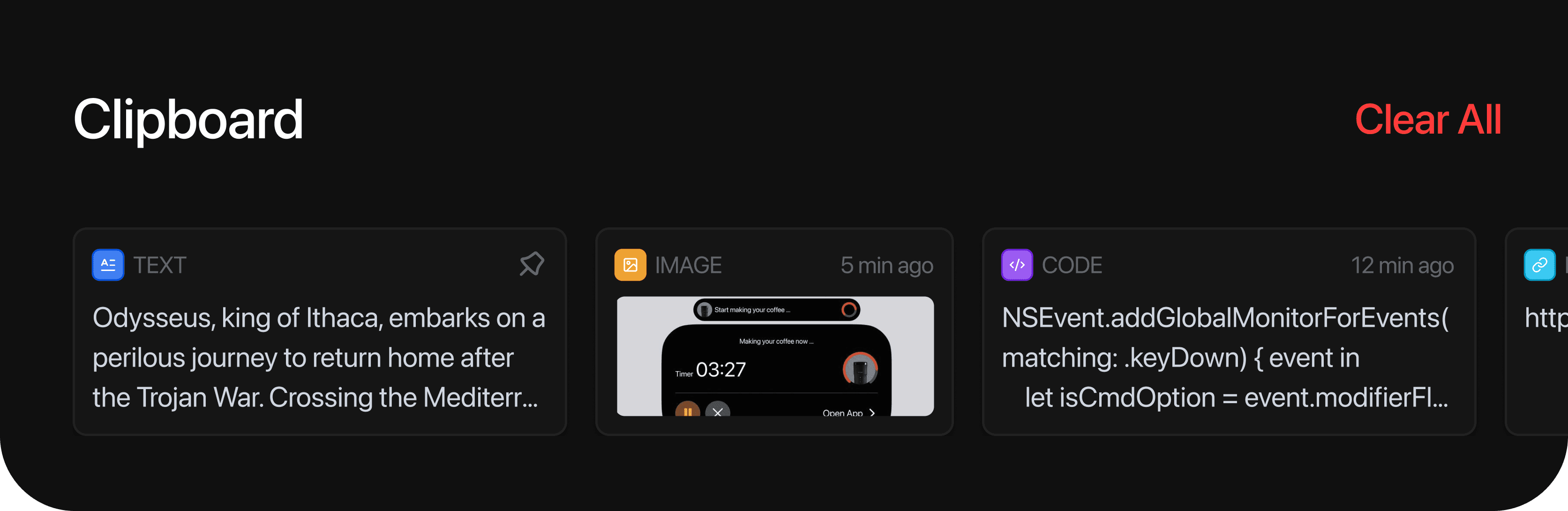
As Product Designer, I designed and built this for Mac end-to-end; turning the notch from a dead zone into a live clipboard, so nothing you copy just vanishes the second you copy something new.
Timeline
July 2026
Role / Context
Product Designer / Passion Project
Leveraged Skills
Interaction Design, AI Development
CONTEXT
I kept losing things. Copy a color hex, copy a link, copy that hex again to check something, and the first one's gone. Every clipboard manager I tried solved it with a new hotkey to memorize or a menu bar dropdown that felt like digging through a drawer. I wanted something that used a gesture I was already doing fifty times a day, not one more thing to learn.
UI DESIGN
The interface takes direct inspiration from iOS's Dynamic Island, borrowing that same idea of a system-level space expanding to hold more than it looks like it should. Press Option+Cmd+V (⌥ +⌘+V) and the notch opens outward into a row of cards. Muted dark surfaces, soft rounded corners, a small colored icon per card so you can tell a color from a link from a code snippet before you even read it, so it feels like glancing at a tray, not searching a list.

PINNING
Pin Items (Option+Click) to Keep Them Past the 15-Item Limit
I kept pasting the same link over and over because copying something new wiped out the last thing, and macOS never gave me a clipboard history to fall back on. So I built one for myself. Most of the decisions came down to one question: does this feel like something new to learn, or something I already know how to do. Cmd+Option+V sits right next to the shortcut I already use, so it never feels bolted on. Fifteen items instead of an endless searchable archive was a bet that recency beats search, I'm almost always looking for what I just copied, not something from last Tuesday.
If you want to know more details of this project, get in touch!
LinkedIn
Copy component
Copied